Published 8 min read
Modern Web Guidance: what it does and how to use it with Claude Code

Key takeaways
Modern Web Guidance is a free skill from the teams behind Chrome, Edge, Firefox and MDN. It gives Claude Code and other coding agents current rules for HTML, CSS, JavaScript, accessibility and performance. Start with Node.js 22: npx modern-web-guidance@latest install
- The guides are plain HTML, CSS and JavaScript; there are no separate guides for React or Vue.
- You can tell the agent used a guide by the "Modern Web Guidance" section at the end of its answer.
- Still check the result in a real browser and with the keyboard.
What is Modern Web Guidance?
Modern Web Guidance is a skill for coding agents: instructions the agent loads by itself when a task fits. It comes with a command line tool holding 210 guides. Each guide is a Markdown file about one task, such as a dialog or an address form, with rules, code patterns, gotchas and browser support. The Chrome, Edge, Firefox and MDN teams maintain it.
According to the makers, training data holds so much legacy code that coding agents often reach for old patterns. You ask for a dialog and get a div with role="dialog" plus a script for focus and Escape. The dialog guide turns that into a native dialog opened by a button with command="show-modal", and the browser handles the focus trap, Escape and returning focus.
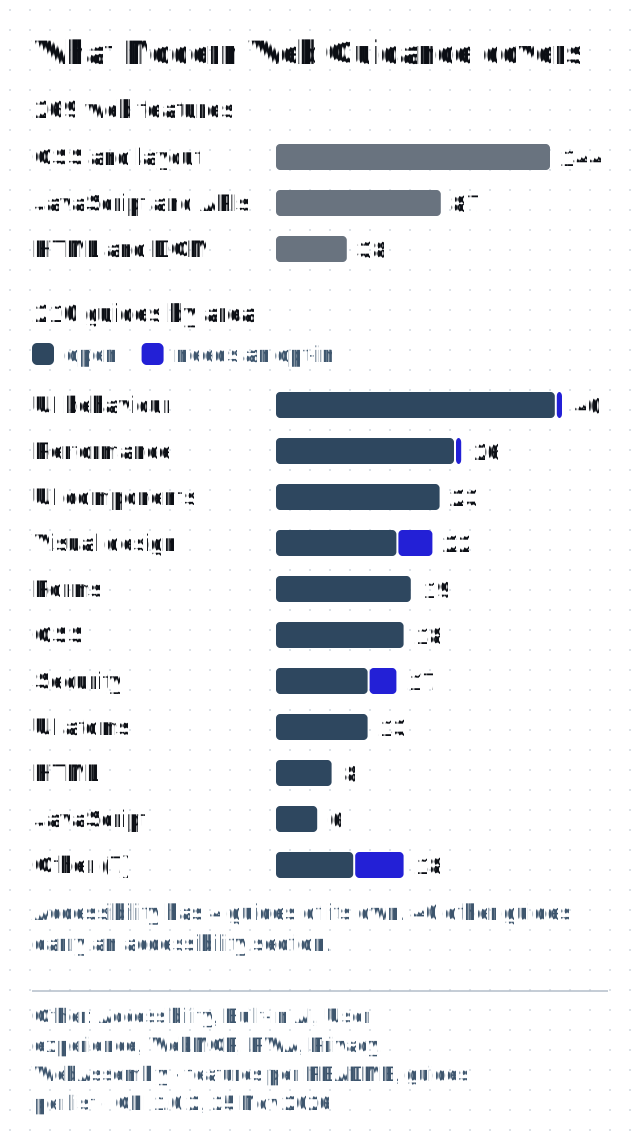
The agent uses three commands:
search "accessible dialog"runs locally without an API key and returns 10 guides.retrieve dialogloads a whole guide into the agent’s context.legacy-scan .scans the project for old code and names a guide per hit.
In the makers’ eval table (run of 20 Nov 2026), Claude Code (Opus 5.5) passes 94 % of automated checks with the skill and 54 % without. Those count passed checks, not solved tasks.
How to set it up
You need Node.js 22 or later. Claude Code users have two routes; the Chrome docs recommend the wizard because it turns on automatic updates.
With the wizard (recommended)
npx modern-web-guidance@latest installIt runs Vercel’s skills CLI and asks which agent you use. By default the skill lands in the project (for Claude Code in .claude/skills/modern-web-guidance) with a skills-lock.json. Add -g to install it for all your projects. Install per project if your team should share one version, globally if you work alone on many sites.
As a plugin in Claude Code
/plugin marketplace add GoogleChrome/modern-web-guidance
/plugin install modern-web-guidance@googlechrome
Then open /plugin, select the GoogleChrome marketplace, turn on AutoUpdate and reload with /reload-plugins. If you installed it from claude-plugins-official earlier, remove that copy first; the README says it has had no updates since 12 October:
/plugin uninstall modern-web-guidance@claude-plugins-officialSet your browser target
By default the target is Baseline Widely available: the agent skips the guide’s fallback only for features that have worked in all major browsers for a while. To set another target, add the sentence from the Chrome docs to your CLAUDE.md:
This project's Baseline target is Baseline 2024.Then anything that has worked in all major browsers since 2024 needs no fallback.
Check that it works
Restart Claude Code in the project and try a small task:
In test.html, build a "Save" button with a tooltip that appears on hover and on focus.You should see two things: a call to modern-web-guidance search before Claude writes code, and a “Modern Web Guidance” section at the end that names a guide such as interest-triggered-tooltips and quotes one of its rules. If both are missing, check that the skill folder exists or the plugin is enabled under /plugin. If Claude asks for permission, allow only npx -y modern-web-guidance@latest with network access, not every npx, as the skill says.
Prompt examples to copy
You do not have to name an API: describe what should happen and the agent finds the guide. The paths are examples; replace the parts in square brackets.
Audit accessibility and keyboard focus
Audit the navigation in [path/to/navigation] for accessibility. Compare the code with matching Modern Web Guidance guides: tab order, visible focus, collapsed submenus. For each finding give file, line, guide and rule. Do not change anything yet.You get a list citing guides such as menu and accessibility, with no edits yet.
Build an accessible dialog
Build a confirmation dialog for "Delete account". It blocks the page behind it, closes on Escape and returns focus to the button afterwards. Use Modern Web Guidance and no library.Expect a native dialog with form method="dialog", initial focus on Cancel and no code to return focus.
Modernize CSS
Modernize the CSS of the product card in [path/to/card.css]. The card should adapt to its own width, not the window. Use Modern Web Guidance and give browser support for every new CSS feature.The agent finds guides such as size-aware-styling and says where a fallback is needed.
Speed up slow clicks (INP)
Clicking "Add to cart" feels slow. Use Modern Web Guidance to find what hurts Interaction to Next Paint and break up long tasks. Tell me how to measure before and after.Matching guides are identify-inp-causes and break-up-long-tasks. Measure yourself, for example in the DevTools Performance panel.
Check a form
Check the form in [path/to/form] with Modern Web Guidance: error messages, autocomplete values, required fields. Errors should appear only after input and be announced to screen readers.The guides rely on :user-invalid and an aria-invalid that matches the visible error.
Find and fix old code
Run npx modern-web-guidance@latest legacy-scan . --json. Check every hit against the rule that comes with it and show me only real ones. Then fix them one by one: read the guide, change the code, run the scan again.Use it on older projects. A typical hit: [...items].sort() becomes items.toSorted(). The rule says when a hit is fine, such as a deliberate fallback.
Review a pull request
Review the changes on this branch against main with Modern Web Guidance. Find the matching guide for every changed component and tell me where the code departs from a rule. Quote the rule word for word.The quote lets you check each comment before merging.
How to get the most out of it
The skill sets the flow: the agent searches with 2 to 5 English words, loads the matching guide and, where it applies, a general one such as accessibility or forms, then builds to it and quotes the rule.
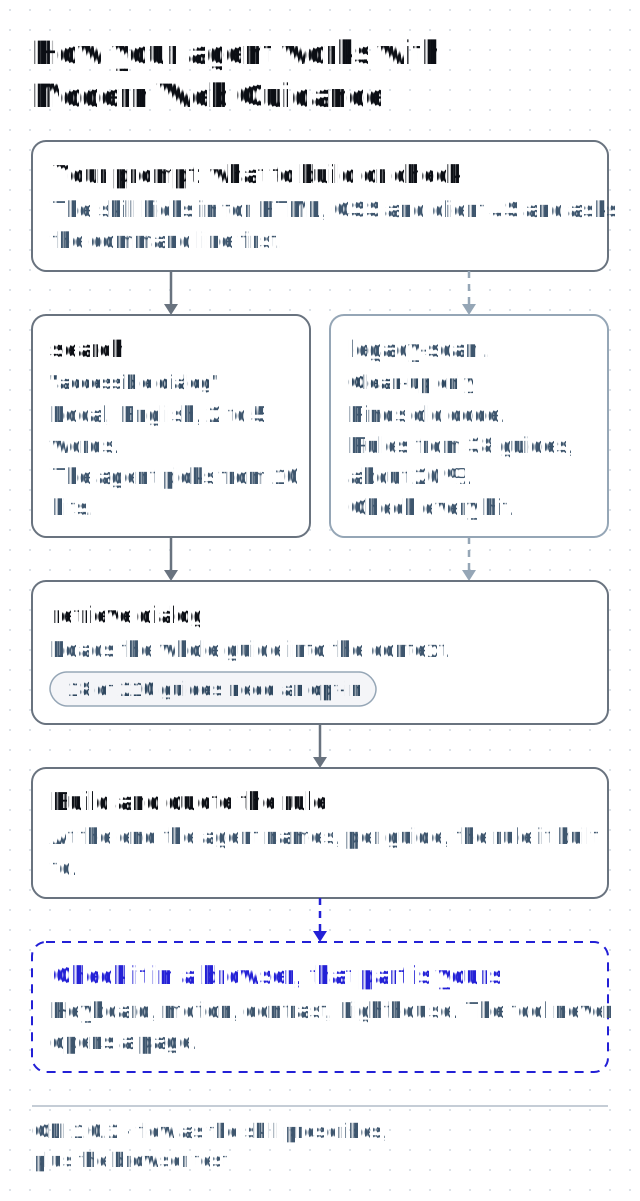
So give one task per prompt: a dialog and dark mode are two searches. legacy-scan is for a whole project, not one component.
In the browser, tab through the page, close dialogs with Escape and turn motion off in your system settings. The makers suggest Chrome DevTools for agents, so the agent can look for itself.
What to watch out for
When online, the command line tool sends anonymous search queries, guide IDs and your agent’s name to Google; according to the README, not your prompts. export DISABLE_TELEMETRY=1 in your .bashrc or .zshrc stops that for good.
18 of the 210 guides are locked. They cover Origin Trials or features only one browser engine ships so far. If the agent tries to read one, the tool refuses and tells it to ask you. Only you can unlock them:
npx modern-web-guidance@latest set-allow-origin-trials
npx modern-web-guidance@latest set-allow-volatile-features
Both ask for confirmation and write a .mwgrc into the project, which you can commit. Unlock only what you need: those features can still change and need a fallback in other browsers.
The scan covers rules from 38 guides, about 20 % of the corpus by its own output. It finds old code but not what is absent, such as fetchpriority on the largest image. In a test file it missed a hand-built div modal with role="dialog".
Every guide the agent reads costs tokens. The dialog guide is 12.6 KB, roughly 3,200 tokens. We estimate a task such as a dialog at 5,000 to 15,000.
From practice: We checked our website striq.de this way: 158 files in the scan, 50 searches, 47 guides, about 165,000 tokens.
legacy-scancaught 7 of 47 findings, all minor. The two worst bugs sat in the menu. Links in a collapsed group stayed reachable by Tab, and focus left the open menu. The agent found them by reading the guides; tabbing through the page in a browser confirmed them. Lighthouse still scored accessibility 90 to 96.
Frequently asked questions
Is Modern Web Guidance free?
Yes. The code is Apache 2.0, the guides are CC BY 4.0. You need no account and no API key, and search runs locally. The only cost is your agent's tokens, because every guide it reads lands in its context.
Does Modern Web Guidance work with Cursor, Codex or GitHub Copilot?
Yes. For Cursor, run the wizard as npx modern-web-guidance@latest install --agent cursor, and the skill lands in the project under .agents/skills. OpenAI Codex, GitHub Copilot CLI, Antigravity, Grok Build CLI, Kimi Code and Pi have their own install commands in the README.
Does Modern Web Guidance replace Lighthouse?
No. Modern Web Guidance measures nothing and never opens a page. It tells the agent what good code looks like. Lighthouse measures load times and catches things like weak contrast. Whether the page works with a keyboard only shows when you tab through it yourself.
Does Modern Web Guidance send data to Google?
Yes, when it is online: install counts, the agent's search queries, the IDs of guides it reads and the agent's name, all anonymous. According to the README your own prompts are not included. Add export DISABLE_TELEMETRY=1 to your .bashrc or .zshrc to turn it off for good.
Which browsers does Modern Web Guidance take into account?
By default it targets Baseline Widely available. For features that are not that widely available yet, the agent builds the fallback from the guide. To set a different target, write it into your CLAUDE.md, for example with the sentence from the Chrome docs: This project's Baseline target is Baseline 2024.
How do I update or uninstall Modern Web Guidance?
After a wizard install, npx modern-web-guidance@latest update fetches the latest version and npx modern-web-guidance@latest uninstall removes the skill after asking you to confirm. For the Claude Code plugin, turn on AutoUpdate under /plugin and remove it with /plugin uninstall modern-web-guidance@googlechrome. On 25 Nov 2026 the current version is 1.0.2; according to the release docs a new one ships every Monday.
Are there guides for React, Vue or Angular?
No. The guides are written in plain HTML, CSS and JavaScript. The skill tells the agent how to carry them over to its framework without dropping the modern feature, for example around types, server rendering and refs. A second pack covers Chrome extensions; pick it with npx modern-web-guidance@latest install --choose.
Do I have to mention Modern Web Guidance in my prompt?
Usually not. The skill's description tells the agent to use it first on every HTML, CSS or client-side JavaScript task. Naming it anyway makes sure the agent searches before it writes.
Sources
The pages the text relies on, as of the article date.
- Modern Web Guidance source code and README on GitHubChrome, Edge, Firefox and MDN
- Modern Web Guidance documentationChrome for Developers
- Modern Web Guidance, get startedChrome for Developers
- Chrome DevTools for agentsChrome for Developers

About the author
Claude Ambassador · Software Engineer · Forward Deployed
Claude Ambassador and software engineer in Düsseldorf. Founder of STRIQ, the umbrella brand behind Habit. Builds AI agents and open-source tools with Claude Code, the Claude Agent SDK and MCP. Speaks about loop engineering: agents that get checked instead of trusted.
Know in 30 minutes what Claude can take over for you
In a first call we work out how your agent uses Modern Web Guidance, what it checks and what a person tests in the browser.
- No preparation and no documents.
- You talk to the person who builds it.
- An honest assessment, even if it argues against a project.
Related articles
Claude Code Agent Teams: when parallel agents pay off, what they cost, how to check them
Claude Code Agent Teams run several Claude Code sessions on one codebase at once: one lead, several teammates, a shared task list. They pay off for work that splits cleanly, and only when a separate check reviews what the team produced.Marco Patzelt9 min readClaude Cowork for business: permissions, data protection and a rollout plan
Claude Cowork for business means the Team or Enterprise plan: commercial terms, no training on your data by default, a DPA included, admin control over access. It is useful when the work lives in files, and risky when it reaches systems nobody reviewed.Marco Patzelt7 min readWhat does Claude cost a business to run?
What does Claude cost a business? People pay per seat, $20 to $125 a month on the Team plan. Systems pay per token on the API, $0.10 to $10 per million input tokens by model, as of November 2026.Marco Patzelt9 min read